

Data retention is available on Enterprise plans. Deleting contacts manually in the app, through Charlie, or through the API is available on every plan and does not require data retention. If data retention is not part of your plan, use Contact Sales on the Organization page to add it.
Configure rules
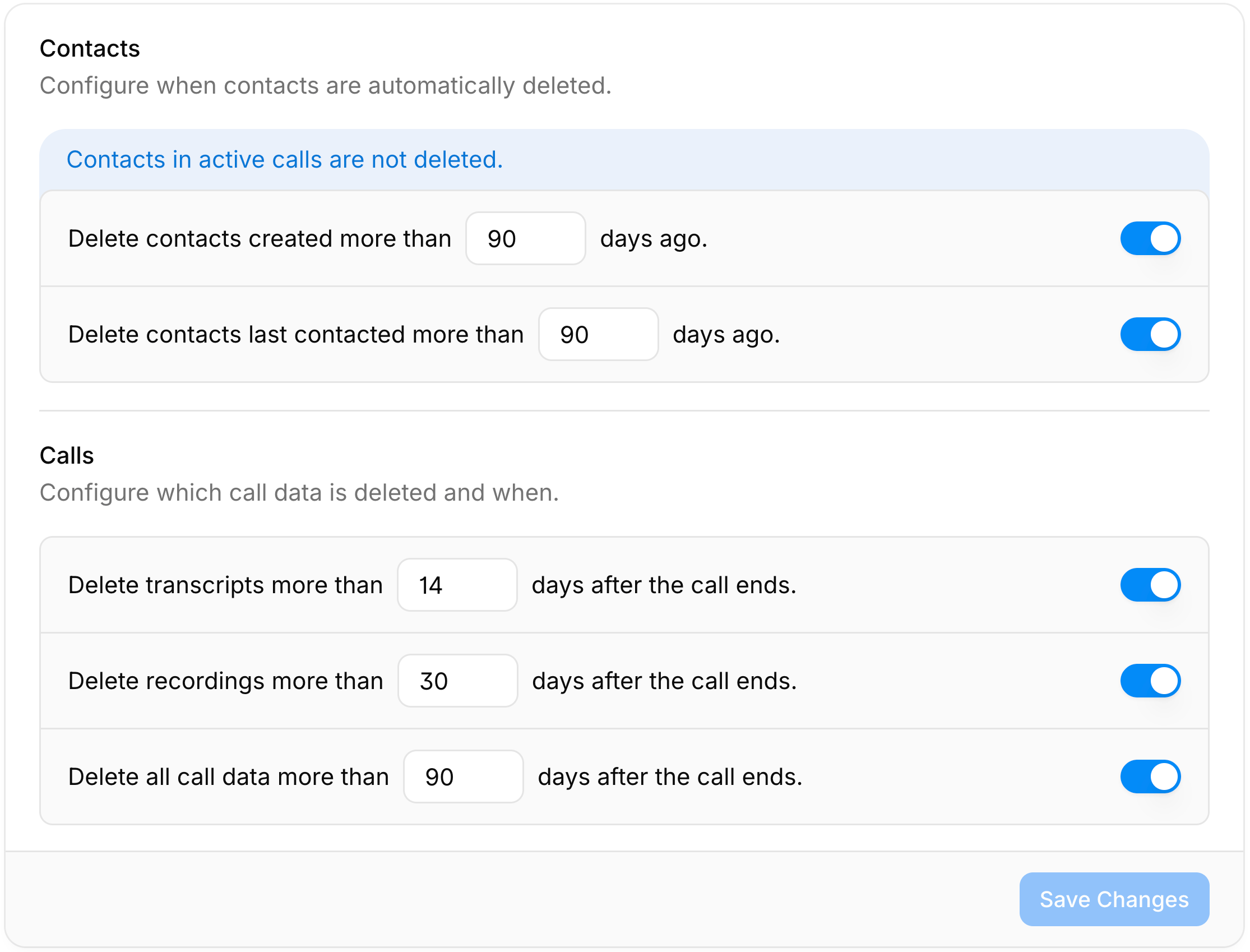
Open Settings > Organization and scroll to Data retention. Each rule has a switch and a retention period between 1 and 730 days.Contacts
If both rules are enabled, a contact is deleted as soon as either rule applies. Deleting a contact also deletes the personal data of all its calls.
Calls
Call rules count from the moment the call was placed and apply to every call in your account, whether or not the contact still exists. They do not apply to simulated calls.
If All call data has a shorter or equal retention period than Recordings or Transcripts, it deletes them first and those rules have no additional effect.
Save and confirm
Click Save Changes to review the pending rules. Because deleted data cannot be recovered, telli asks you to type a confirmation phrase before the rules take effect. Deleting data also reduces the call history Charlie can draw on for insights.How deletion runs
- telli checks all enabled rules once a day and deletes everything that has passed its retention period.
- Contacts in active calls are not deleted.
- Data is deleted in batches, so a large backlog can take more than one run to clear.
- Deletion is irreversible. telli never deletes records in your CRM or other connected systems.