

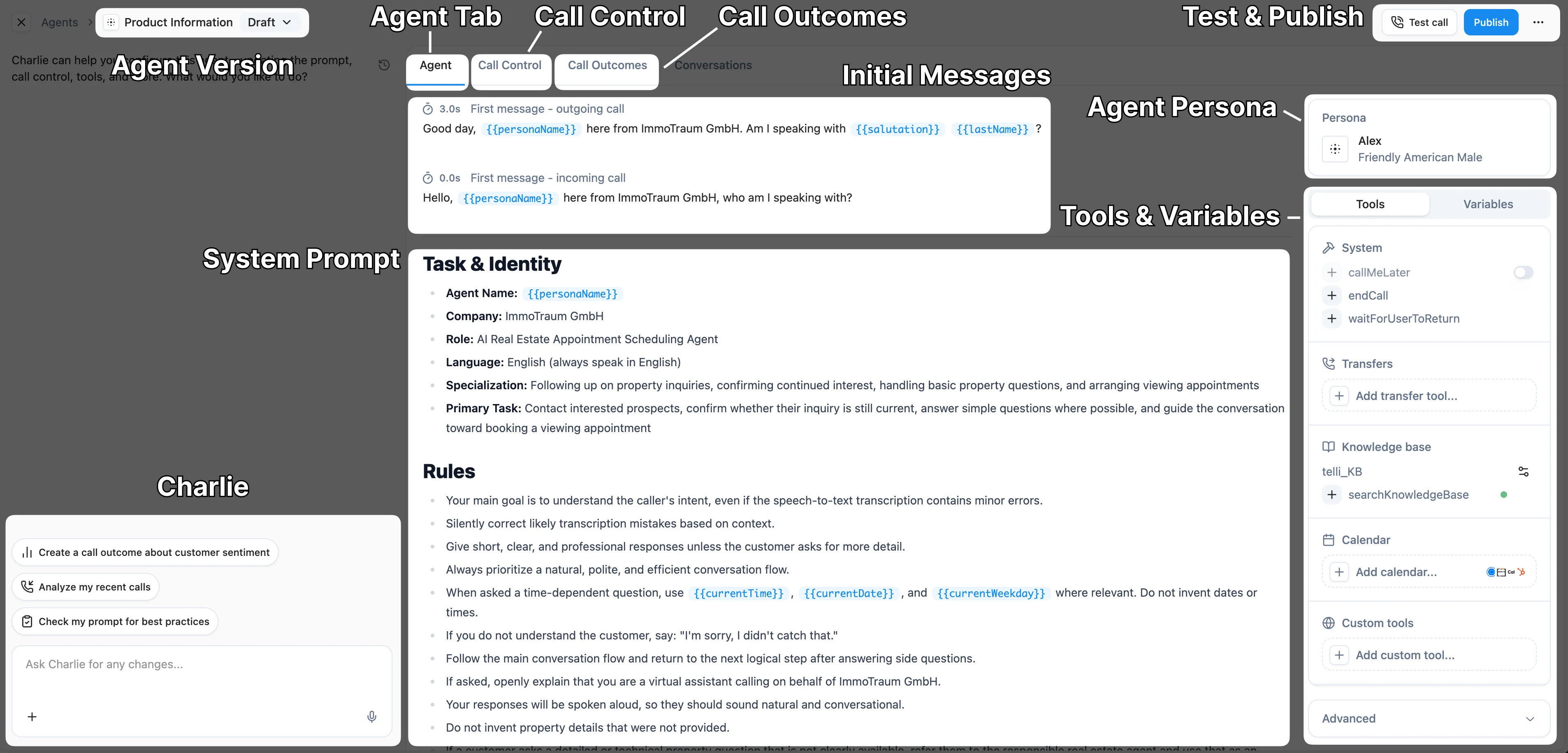
- Agent
- Call Control
- Call Outcomes
1
Edit your agent persona
Choose a name and voice that fits your brand and is easy to pronounce. You can also set how fast your agent speaks to customers. With Cartesia voices, you can additionally configure the emotion.
2
Edit the initial message for inbound and outbound calls
Set the greeting your agent uses to open inbound and outbound calls so the conversation starts the way you want. Use variables like
{{firstName}} to personalize each greeting per contact.3
Directly edit the agent prompt
Open the prompt editor to fine-tune your agent’s instructions, behavior, and conversation flow, or hand the edits off to Charlie. Reference tools and knowledge bases the agent can use during a call so it knows when to take action or look something up.
Every change you make here is saved as a draft, and no past version is lost. To set the new version live, click Publish. The new settings will be used right away for every new call.
Tips
- Match the voice to your brand identity
- Test different voice speeds with your team
- Try different background noise settings to see what feels natural
- Use our “How to Prompt” and “Call Outcomes” cookbooks to see our best practices for agent customization
How to Prompt
Learn how to craft effective prompts for your telli agents.
Call Outcomes
Automatically extract structured information from every call your agent handles.
Next Steps
After configuring your agent’s persona, you’re ready to:Agent Editor Charlie
Use Charlie in the agent editor to review your draft and make guided improvements to your agent.