telli calendar integrations We provide flexible calendar integration options to help manage appointments efficiently through our system.

In the telli App

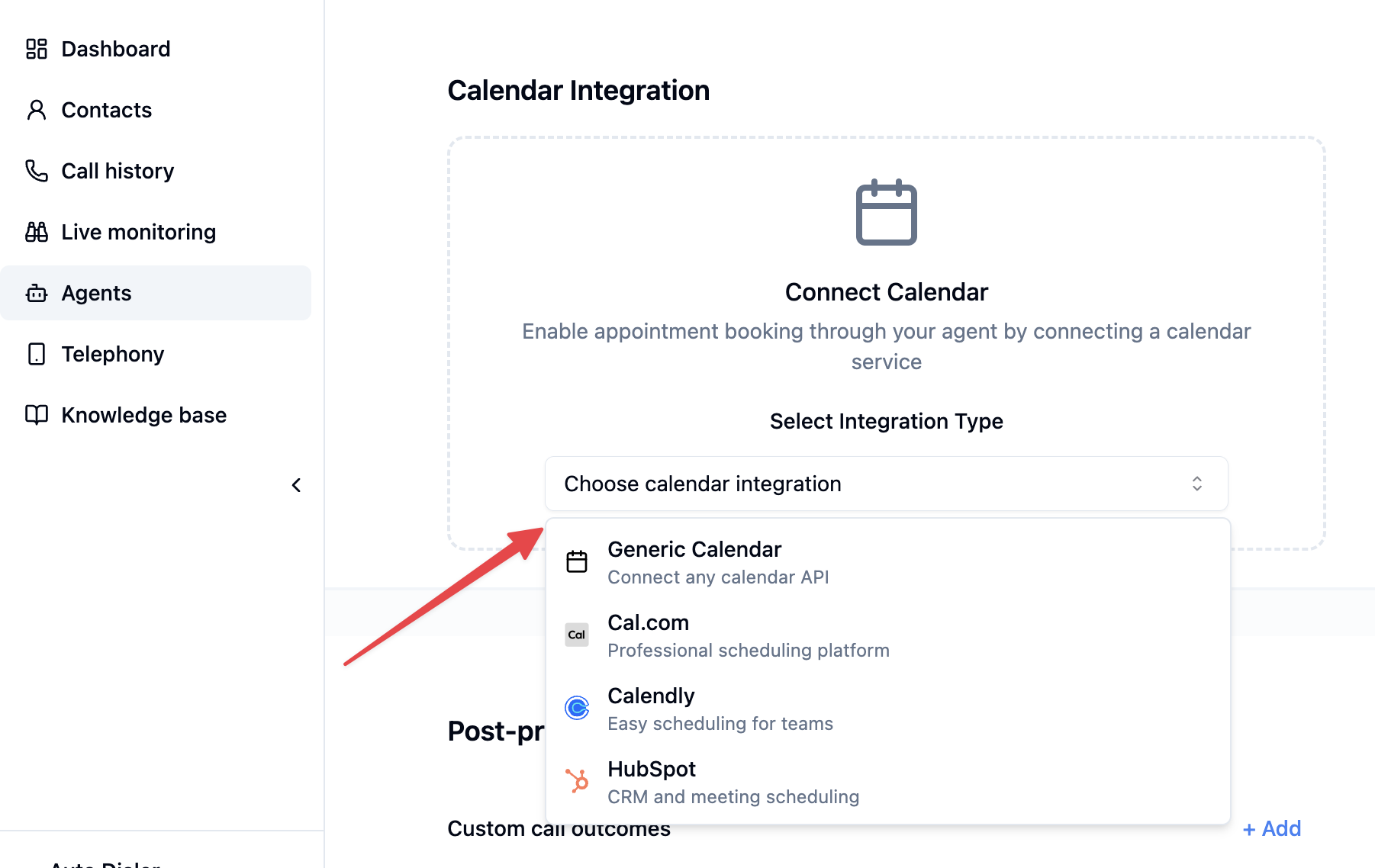
To connect a calendar to your agent, navigate to your agent’s settings and find the Calendar Integration section. Select your preferred integration type from the dropdown menu. Calendar integration in the telli app

Native Integrations

We offer built-in integrations with popular calendar services:
When connecting Calendly, you can configure booking fields to automatically fill in the custom questions on your Calendly event type during booking. Each booking field maps a Calendly question to a value source.

Value types

TypeDescriptionExample
ConstantA fixed value, always the sameBrand name, company name
Contact propertyResolved from the contact’s data. If not available, the agent will ask the caller for itPhone number, email, first name
System variableResolved from internal system data using a path expressionContact ID, timezone
LLM parameterCollected by the agent during the conversationReason for appointment, preferred language

How it works

  1. In the agent settings, go to Calendar Integration and select Calendly
  2. Connect your Calendly account with an API key and select an event type
  3. Click the settings icon next to the selected Calendly event type to configure the booking fields
  4. Choose the value type and configure the mapping
The agent will automatically resolve these fields when booking an appointment. Contact properties and constants are filled in without any extra conversation, while LLM parameters prompt the agent to collect the information from the caller.
Every required custom question on your Calendly event type must have a corresponding booking field configured, otherwise the booking will fail. Optional questions without a mapping are simply skipped.
Follow these steps to enable Hubspot integration:To connect your Hubspot calendar, you’ll need two pieces of information:
  • Meeting link slug
  • Access token
  1. Make sure you’re using Hubspot’s Meetings Scheduler tool
  2. Go to Meetings Scheduler (Menu -> Library -> Meetings Scheduler)
  3. Select the meeting you’ve created (e.g. Demo) and select Copy link
  4. Share the meeting link with telli (the last part of the link is the meeting link slug)

Create a Private App

  1. Create a private app by following the official guide
  2. In the Scopes tab, select the following scopes:
    • crm.objects.contacts.write
    • crm.schemas.contacts.write
    • scheduler.meetings.meeting-link.read
    • tickets
  3. Create an access token and share it with telli

Custom Integrations

The appointment API allows you to connect your existing calendar or appointment system with telli agents, enabling seamless appointment scheduling for your customers.

Overview

Technical Implementation

You’ll need to implement two simple endpoints that telli will call: Note: Both endpoints receive contact_details containing the contact information provided by the customer (name, email, phone) which can be used for appointment booking and confirmation.

Get Available Slots

This endpoint returns a list of available appointment slots.
POST /available

// Request Example
{
    "contact_id": "telli contact identifier",
    "external_contact_id": "your contact identifier",
    "contact_details": {
        "foobar": "baz",
    }
}

// Response Example
{
    "available": [
        {
            "start_iso": "2024-01-01T10:00:00.000",
            "end_iso": "2024-01-01T10:30:00.000",
        },
        {
            "start_iso": "2024-01-01T11:00:00.000",
            "end_iso": "2024-01-01T11:30:00.000",
        }
    ]
}

Book Appointment

This endpoint handles the actual booking of a selected time slot.
POST /book

// Request Example
{
    "contact_id": "telli contact identifier",
    "external_contact_id": "your contact identifier",
    "start_iso": "2024-01-01T10:00:00.000",
    "contact_details": {
        "foobar": "baz",
    }
}

// Successful Response Example
{
    "status": "success"
}

// Failed Response Example
{
    "status": "failed",
    "reason": "Appointment slot is no longer available"
}

Example Conversation Flow

Customer: "Hi, I need to schedule an appointment."

Agent: "I'll help you with that. Let me check the available slots...
       I see the following options:
       - Monday, Jan 1st at 10:00 AM (30 minutes)
       - Monday, Jan 1st at 11:00 AM (30 minutes)
       Which time works better for you?"

Customer: "I'll take the 10 AM slot."

Agent: "Great! I've booked your appointment for Monday, January 1st at 10:00 AM.
       You're all set!"

Implementation Notes

  • All times should be in UTC using ISO 8601 format (e.g., “2024-01-01T10:00:00.000Z”)
  • We use the start_iso time as the identifier of the slot
  • Responses should always return HTTP 200, with success/failure indicated in the response body
  • Make sure your endpoints are accessible from telli’s servers
To ensure secure communication, all requests from telli to your calendar endpoints are authenticated using HMAC signatures.
Request Authentication
Each request includes a x-telli-signature header containing an HMAC-SHA256 signature. You should verify this signature before processing any requests.
const crypto = require("crypto");

function verifyRequest(payload, signature, apiKey) {
 const expectedSignature = crypto
    .createHmac("sha256", apiKey)
    .update(JSON.stringify(payload))
    .digest("hex");

  return signature === expectedSignature;
}
const express = require("express");
const app = express();

app.use(express.json());

const API_KEY = "your_api_key"; // The API key provided by telli

app.post("/available", (req, res) => {
  const signature = req.headers["x-telli-signature"];

  if (!verifyRequest(req.body, signature, API_KEY)) {
    return res.status(401).send("Invalid signature");
  }

  // Process the request
  // ... your logic here
});

app.post("/book", (req, res) => {
  const signature = req.headers["x-telli-signature"];

  if (!verifyRequest(req.body, signature, API_KEY)) {
    return res.status(401).send("Invalid signature");
  }

  // Process the booking
  // ... your logic here
});