> ## Documentation Index
> Fetch the complete documentation index at: https://docs.telli.com/llms.txt
> Use this file to discover all available pages before exploring further.
# Receive call data
> Receive call data and their analysis using webhooks to automatically update your CRM
## Prerequisites
* A telli account with API access
* A CRM system (e.g., Airtable, Salesforce, HubSpot, Pipedrive) or automation platform (Zapier, Make, n8n)
* A webhook endpoint URL from your CRM or automation platform
## Setup to receive call data in your CRM
Webhooks enable telli to automatically send call data to your CRM in real-time. When calls complete, telli sends POST requests to your webhook endpoint with complete call information, transcripts, and analysis results. This allows you to automatically update CRM records with call outcomes, qualify leads, and track contact status without manual data entry.
You can configure one endpoint per service to listen to all event types. This means your CRM will automatically receive data about calls and their analysis in real-time, keeping your customer records always up to date.
## Setting Up Webhooks for Your CRM
To automatically sync call data to your CRM:
1. In your CRM or automation platform (Zapier, Make, n8n), create a webhook endpoint and copy the URL
2. In telli, go to Settings > Developer and click "Configure" under "Webhook configuration"
3. Click "Add Endpoint" and paste your CRM's webhook URL
4. Enable the events you want to receive (e.g. "call\_ended" to update CRM records when calls complete)
5. Make a test call using your telli account
6. Verify that the webhook triggered and your CRM record was updated automatically
The way to indicate that a webhook has been processed is by returning a 2xx (status code 200-299) response to the webhook message within a reasonable time-frame (15s).
To connect your CRM to telli, you'll need to configure a webhook endpoint. This is the URL where telli will send call data to update your CRM records.
In telli, go to Settings > Developer and click "Configure" under "Webhook configuration" to access the webhook portal.
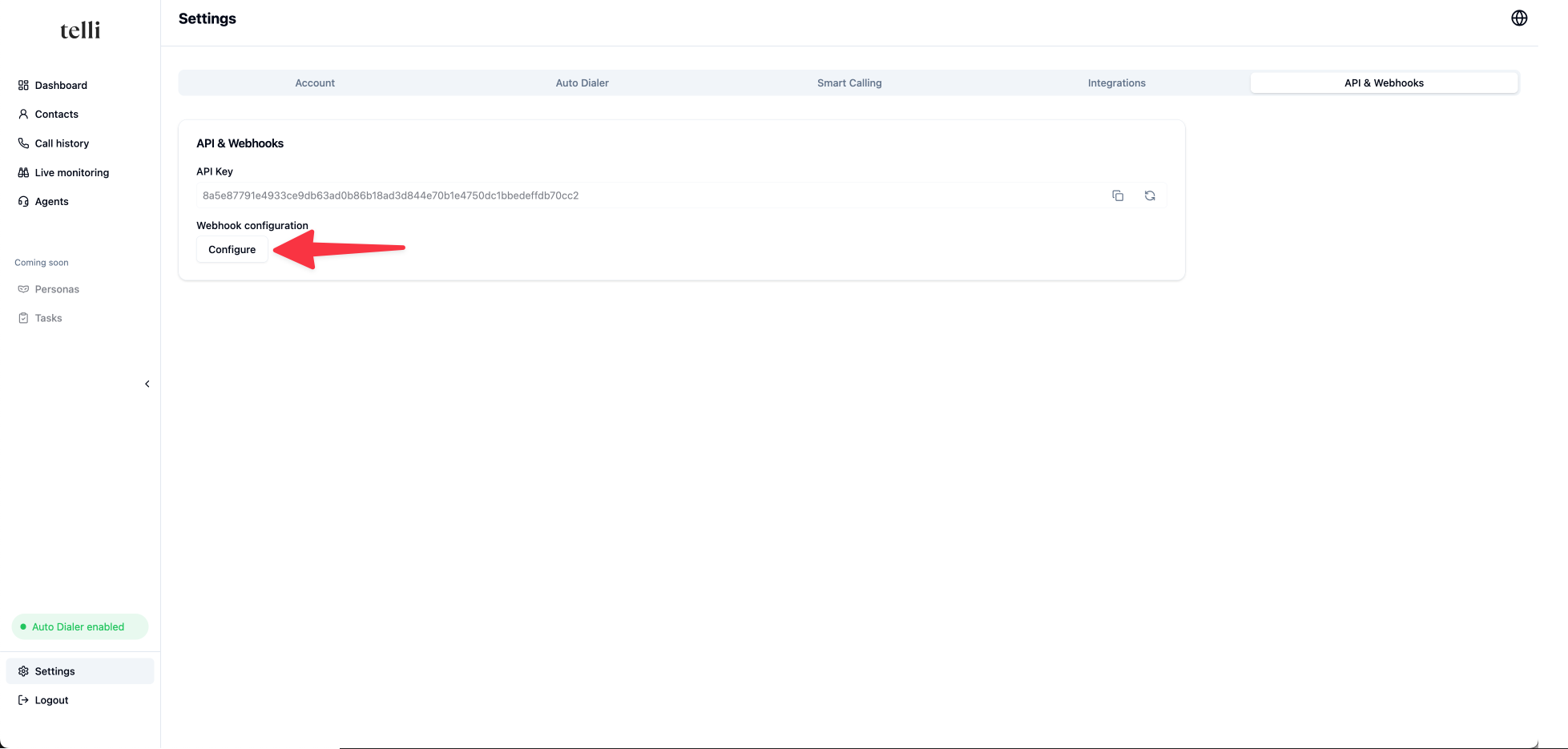 Click on "Add Endpoint" to add your CRM's webhook URL. Paste the URL from your CRM or automation platform and click "Add".
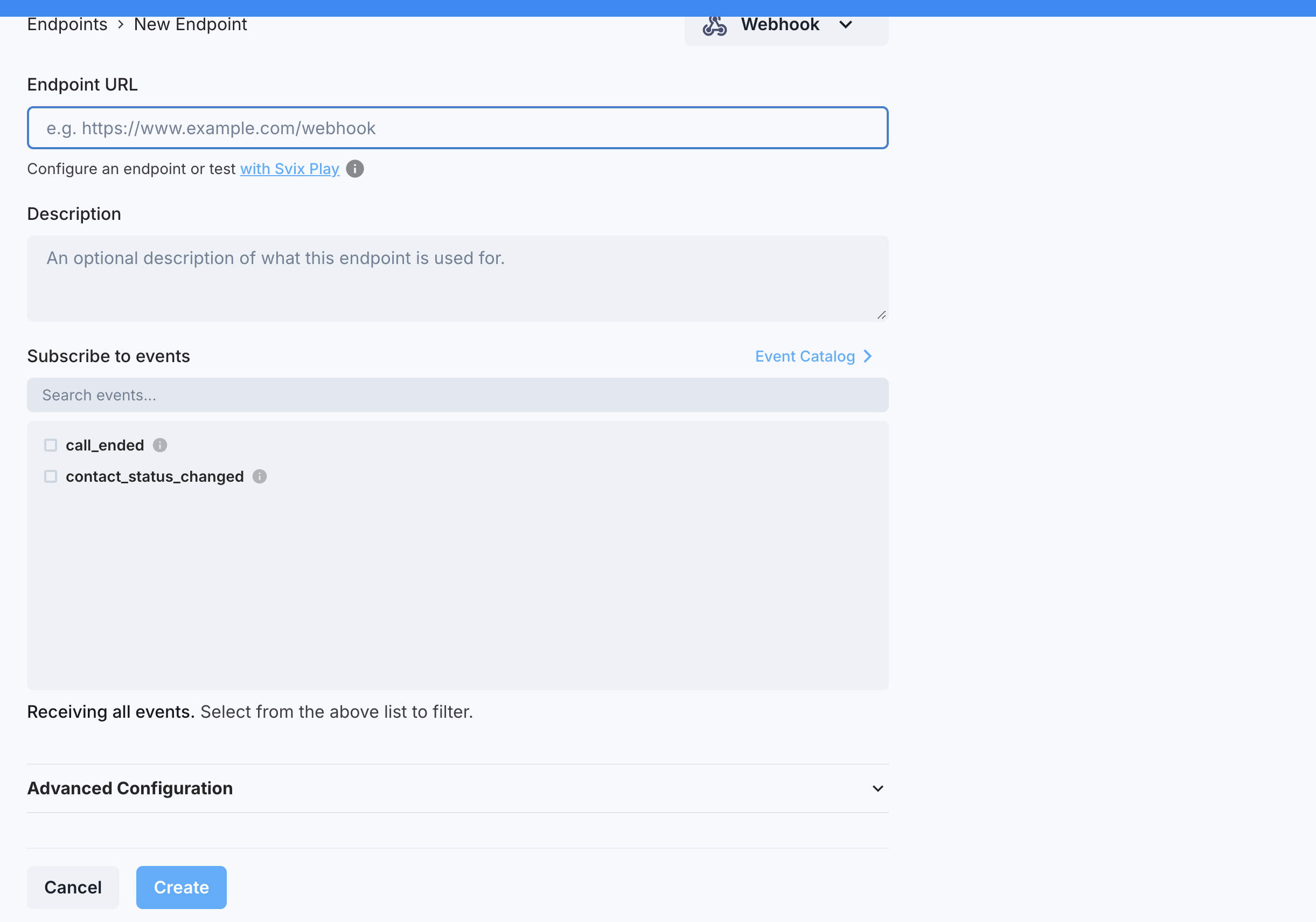 You can now enable the events you want to receive (e.g. "call\_ended") to automatically update your CRM when calls complete.
# Events
We support the following webhook events:
* [call\_ended](/webhook#call-ended): Triggered when a call completes, including transcript and analysis
* [auto\_dialer\_status\_changed](/webhook#auto-dialer-status-changed): Triggered when a contact enters or exits the auto dialer
* [contact\_status\_changed](/webhook#contact-status-changed): Deprecated contact status event; removed July 1, 2027
### Call Ended Event
When a call is completed and analyzed, telli automatically sends a webhook to your CRM with detailed information about the call. This includes the transcript, analysis results, and complete contact information, allowing you to update CRM records with call outcomes, qualify leads, and track customer interactions automatically.
**Status**
The `call_ended` payload describes the outcome of the call with three fields:
* `state`: where the call is in its lifecycle. One of `queued`, `ringing`, `in_progress`, or `ended`.
* `status`: what happened once the call ended. `null` until the call has ended, then one of:
* `connected`: a conversation occurred with the contact
* `not_connected`: we weren't able to reach the contact
* `voicemail`: we reached the contact's voicemail
* `failed`: an error occurred during the call
* `follow_up`: the follow-up telli scheduled from the call, or `null` if none. When present it is `{ "type": "agent_follow_up", "scheduled_at": "" }`.
**Call Status (deprecated)**
`call_status` is deprecated. Use `status`, `state`, and `follow_up` instead.
The legacy `call_status` field can be one of the following:
* `COMPLETED`: A conversation occurred with the contact
* `ANSWERED`: A call occurred but another attempt will be made to reach the contact
* `NOT_REACHED`: We weren't able to reach the contact
* `VOICEMAIL`: We got the voicemail of the contact
* `ERROR`: An error occurred in the call
**Call outcome and call analysis**
After each customer call, telli automatically analyzes the transcript to extract key insights that you can use to update your CRM. The webhook includes two types of analysis data:
* `call_outcome`: custom call analysis fields that you can configure in the telli app
```
{
"custom_lost_reason": { // call analysis field name
"value": "PRODUCT_TOO_EXPENSIVE", // call analysis value
"fieldSchema": ... // information about schema
}
}
```
* `call_analysis`: system-provided call analysis fields
Notice that the `call_analysis` format is different from the `call_outcome` format:
```
{
"appointment": {
"value": true, // boolean: is the value present?
"details": "2025-02-18T15:30:00Z", // additional details (string or number)
}
}
```
**Collected data**
If the agent has [Collect Data](/deep-dives/collected-data) tasks configured, the `collected_data` field contains data actively collected and confirmed with the caller during the call:
```json theme={null}
{
"email": {
"status": "confirmed",
"value": "user@example.com"
},
"case_number": {
"status": "declined",
"value": null
}
}
```
Each key maps to an object with:
* `status`: `"confirmed"` | `"declined"` | `"error"` | `"in_progress"`
* `value`: the collected string, or `null` if not collected
When no Collect Data tasks are configured or none were triggered, `collected_data` is `null`.
```json theme={null}
{
"event": "call_ended",
"call": {
"agent_id": "d8931604-92ad-45cf-9071-d9cd2afbad0c",
"attempt": 1,
"booked_slot_for": "2025-02-24T15:30:00Z",
"call_analysis": {
"appointment": {
"details": "2025-02-18T15:30:00Z",
"value": true
},
"interest": {
"details": "The customer is interested in buying an ice cream machine",
"value": true
},
"summary": {
"details": "A call between an agent and a customer talking about buying an ice cream machine",
"value": true
}
},
"call_id": "b4a05730-2abc-4eb0-8066-2e4d23b53ba9",
"call_length_min": 2,
"call_outcome": {
"custom_lost_reason": {
"fieldSchema": {
"enum": [
"CUSTOMER_NOT_INTERESTED",
"CUSTOMER_PREVIOUSLY_CONTACTED",
"PRODUCT_TOO_EXPENSIVE"
],
"type": ["string", "null"]
},
"value": "PRODUCT_TOO_EXPENSIVE"
}
},
"call_status": "COMPLETED",
"state": "ended",
"status": "connected",
"follow_up": null,
"collected_data": {
"email": {
"status": "confirmed",
"value": "frida@kahlo.com"
}
},
"contact_id": "6bd1e7e0-6d00-4c0b-ad5b-daa72457a27d",
"direction": "outbound",
"ended_at": 1731957002078,
"external_contact_id": "external-123",
"from_number": "+17755719467",
"loop_id": "ba99c99d-19b9-4a0d-8df6-3e213088989a",
"recording_url": "",
"sip_status_code": 200,
"sip_status": "OK",
"started_at": 1731956932264,
"to_number": "+16506794960",
"transcript": "Agent: Hello...",
"transcriptObject": [
{
"content": "Hello...",
"role": "agent"
}
],
"triggered_at": 1731956924302
},
"contact": {
"call_attempts": 1,
"contact_details": {
"company": "Art Studio Inc",
"notes": "Interested in solar panels"
},
"contact_id": "6bd1e7e0-6d00-4c0b-ad5b-daa72457a27d",
"created_at": "2024-11-18T15:30:00.000Z",
"email": "frida@kahlo.com",
"external_contact_id": "external-123",
"first_name": "Frida",
"in_call_since": null,
"last_name": "Kahlo",
"next_call_at": null,
"phone_number": "+14155552671",
"reached_at": "2024-11-18T15:45:00.000Z",
"salutation": "Ms.",
"status": "reached",
"timezone": "America/Los_Angeles"
}
}
```
### Contact Status Changed Event
This webhook is deprecated and will be removed on July 1, 2027.
The contact status changed event automatically updates your CRM as contacts progress through calling campaigns. Each contact moves through different states, and your CRM is notified in real-time so you can track lead progression and prioritize follow-ups.
#### Contact Statuses
Contacts can have the following statuses:
* `new`: Contact has not been called yet
* `pending`: Contact is in dialer and we are trying to reach them
* `closed`: Dialer was exhausted and we are not trying to call them anymore
* `reached`: Contact was reached and had a conversation. We are not trying to call them anymore
```json theme={null}
{
"event": "contact_status_changed",
"contact": {
"contact_id": "6bd1e7e0-6d00-4c0b-ad5b-daa72457a27d",
"external_contact_id": "external-123",
"status": "reached",
"status_updated_at": "2024-03-18T15:30:00Z",
"reached_at": "2024-03-18T15:30:00Z",
"first_name": "Frida",
"last_name": "Kahlo",
"phone_number": "+14155552671",
"email": "frida@kahlo.com"
}
}
```
## Security and Reliability
### Verifying Signatures
To ensure webhook messages updating your CRM are actually from telli and not a malicious actor, you should verify webhook signatures. This is optional but recommended for production CRM integrations.
For a more detailed explanation, check out this article on [why you should verify webhooks](https://docs.svix.com/receiving/verifying-payloads/why).
```javascript theme={null}
import { Webhook } from "svix";
// You can get this secret from the Webhook Configuration in the telli dashboard
const secret = "whsec_GET_THIS_FROM_THE_DASHBOARD";
// These were all sent from the server
const headers = {
"svix-id": "msg_p5jXN8AQM9LWM0D4loKWxJek",
"svix-timestamp": "1614265330",
"svix-signature": "v1,g0hM9SsE+OTPJTGt/tmIKtSyZlE3uFJELVlNIOLJ1OE=",
};
const payload = '{"test": 2432232314}';
const wh = new Webhook(secret);
// Throws on error, returns the verified content on success
const payload = wh.verify(payload, headers);
```
For instructions for verifying signatures, check out their [webhook verification documentation](https://docs.svix.com/receiving/verifying-payloads/how). The docs include examples in JavaScript, Python, Go, Java, PHP and other languages.
> Hint: Disable CSRF protection for your endpoint to allow webhook POST requests
#### Automatic Retries
We attempt to deliver each webhook message based on a retry schedule with exponential backoff.
**The schedule**
Each message is attempted based on the following schedule, where each period is started following the failure of the preceding attempt:
* Immediately
* 5 seconds
* 5 minutes
* 30 minutes
* 2 hours
* 5 hours
* 10 hours
* 10 hours (in addition to the previous)
If an endpoint is removed or disabled delivery attempts to the endpoint will be disabled as well.
For example, an attempt that fails three times before eventually succeeding will be delivered roughly 35 minutes and 5 seconds following the first attempt.
#### Manual Retries
You can also use the webhook portal to manually retry each message at any time, or automatically retry ("Recover") all failed messages starting from a given date.
**Reliability Features:**
* **Automatic retries**: Failed webhook deliveries are retried with exponential backoff
* **Manual recovery**: Retry failed messages through the webhook portal
You can now enable the events you want to receive (e.g. "call\_ended") to automatically update your CRM when calls complete.
# Events
We support the following webhook events:
* [call\_ended](/webhook#call-ended): Triggered when a call completes, including transcript and analysis
* [auto\_dialer\_status\_changed](/webhook#auto-dialer-status-changed): Triggered when a contact enters or exits the auto dialer
* [contact\_status\_changed](/webhook#contact-status-changed): Deprecated contact status event; removed July 1, 2027
### Call Ended Event
When a call is completed and analyzed, telli automatically sends a webhook to your CRM with detailed information about the call. This includes the transcript, analysis results, and complete contact information, allowing you to update CRM records with call outcomes, qualify leads, and track customer interactions automatically.
**Status**
The `call_ended` payload describes the outcome of the call with three fields:
* `state`: where the call is in its lifecycle. One of `queued`, `ringing`, `in_progress`, or `ended`.
* `status`: what happened once the call ended. `null` until the call has ended, then one of:
* `connected`: a conversation occurred with the contact
* `not_connected`: we weren't able to reach the contact
* `voicemail`: we reached the contact's voicemail
* `failed`: an error occurred during the call
* `follow_up`: the follow-up telli scheduled from the call, or `null` if none. When present it is `{ "type": "agent_follow_up", "scheduled_at": "" }`.
**Call Status (deprecated)**
`call_status` is deprecated. Use `status`, `state`, and `follow_up` instead.
The legacy `call_status` field can be one of the following:
* `COMPLETED`: A conversation occurred with the contact
* `ANSWERED`: A call occurred but another attempt will be made to reach the contact
* `NOT_REACHED`: We weren't able to reach the contact
* `VOICEMAIL`: We got the voicemail of the contact
* `ERROR`: An error occurred in the call
**Call outcome and call analysis**
After each customer call, telli automatically analyzes the transcript to extract key insights that you can use to update your CRM. The webhook includes two types of analysis data:
* `call_outcome`: custom call analysis fields that you can configure in the telli app
```
{
"custom_lost_reason": { // call analysis field name
"value": "PRODUCT_TOO_EXPENSIVE", // call analysis value
"fieldSchema": ... // information about schema
}
}
```
* `call_analysis`: system-provided call analysis fields
Notice that the `call_analysis` format is different from the `call_outcome` format:
```
{
"appointment": {
"value": true, // boolean: is the value present?
"details": "2025-02-18T15:30:00Z", // additional details (string or number)
}
}
```
**Collected data**
If the agent has [Collect Data](/deep-dives/collected-data) tasks configured, the `collected_data` field contains data actively collected and confirmed with the caller during the call:
```json theme={null}
{
"email": {
"status": "confirmed",
"value": "user@example.com"
},
"case_number": {
"status": "declined",
"value": null
}
}
```
Each key maps to an object with:
* `status`: `"confirmed"` | `"declined"` | `"error"` | `"in_progress"`
* `value`: the collected string, or `null` if not collected
When no Collect Data tasks are configured or none were triggered, `collected_data` is `null`.
```json theme={null}
{
"event": "call_ended",
"call": {
"agent_id": "d8931604-92ad-45cf-9071-d9cd2afbad0c",
"attempt": 1,
"booked_slot_for": "2025-02-24T15:30:00Z",
"call_analysis": {
"appointment": {
"details": "2025-02-18T15:30:00Z",
"value": true
},
"interest": {
"details": "The customer is interested in buying an ice cream machine",
"value": true
},
"summary": {
"details": "A call between an agent and a customer talking about buying an ice cream machine",
"value": true
}
},
"call_id": "b4a05730-2abc-4eb0-8066-2e4d23b53ba9",
"call_length_min": 2,
"call_outcome": {
"custom_lost_reason": {
"fieldSchema": {
"enum": [
"CUSTOMER_NOT_INTERESTED",
"CUSTOMER_PREVIOUSLY_CONTACTED",
"PRODUCT_TOO_EXPENSIVE"
],
"type": ["string", "null"]
},
"value": "PRODUCT_TOO_EXPENSIVE"
}
},
"call_status": "COMPLETED",
"state": "ended",
"status": "connected",
"follow_up": null,
"collected_data": {
"email": {
"status": "confirmed",
"value": "frida@kahlo.com"
}
},
"contact_id": "6bd1e7e0-6d00-4c0b-ad5b-daa72457a27d",
"direction": "outbound",
"ended_at": 1731957002078,
"external_contact_id": "external-123",
"from_number": "+17755719467",
"loop_id": "ba99c99d-19b9-4a0d-8df6-3e213088989a",
"recording_url": "",
"sip_status_code": 200,
"sip_status": "OK",
"started_at": 1731956932264,
"to_number": "+16506794960",
"transcript": "Agent: Hello...",
"transcriptObject": [
{
"content": "Hello...",
"role": "agent"
}
],
"triggered_at": 1731956924302
},
"contact": {
"call_attempts": 1,
"contact_details": {
"company": "Art Studio Inc",
"notes": "Interested in solar panels"
},
"contact_id": "6bd1e7e0-6d00-4c0b-ad5b-daa72457a27d",
"created_at": "2024-11-18T15:30:00.000Z",
"email": "frida@kahlo.com",
"external_contact_id": "external-123",
"first_name": "Frida",
"in_call_since": null,
"last_name": "Kahlo",
"next_call_at": null,
"phone_number": "+14155552671",
"reached_at": "2024-11-18T15:45:00.000Z",
"salutation": "Ms.",
"status": "reached",
"timezone": "America/Los_Angeles"
}
}
```
### Contact Status Changed Event
This webhook is deprecated and will be removed on July 1, 2027.
The contact status changed event automatically updates your CRM as contacts progress through calling campaigns. Each contact moves through different states, and your CRM is notified in real-time so you can track lead progression and prioritize follow-ups.
#### Contact Statuses
Contacts can have the following statuses:
* `new`: Contact has not been called yet
* `pending`: Contact is in dialer and we are trying to reach them
* `closed`: Dialer was exhausted and we are not trying to call them anymore
* `reached`: Contact was reached and had a conversation. We are not trying to call them anymore
```json theme={null}
{
"event": "contact_status_changed",
"contact": {
"contact_id": "6bd1e7e0-6d00-4c0b-ad5b-daa72457a27d",
"external_contact_id": "external-123",
"status": "reached",
"status_updated_at": "2024-03-18T15:30:00Z",
"reached_at": "2024-03-18T15:30:00Z",
"first_name": "Frida",
"last_name": "Kahlo",
"phone_number": "+14155552671",
"email": "frida@kahlo.com"
}
}
```
## Security and Reliability
### Verifying Signatures
To ensure webhook messages updating your CRM are actually from telli and not a malicious actor, you should verify webhook signatures. This is optional but recommended for production CRM integrations.
For a more detailed explanation, check out this article on [why you should verify webhooks](https://docs.svix.com/receiving/verifying-payloads/why).
```javascript theme={null}
import { Webhook } from "svix";
// You can get this secret from the Webhook Configuration in the telli dashboard
const secret = "whsec_GET_THIS_FROM_THE_DASHBOARD";
// These were all sent from the server
const headers = {
"svix-id": "msg_p5jXN8AQM9LWM0D4loKWxJek",
"svix-timestamp": "1614265330",
"svix-signature": "v1,g0hM9SsE+OTPJTGt/tmIKtSyZlE3uFJELVlNIOLJ1OE=",
};
const payload = '{"test": 2432232314}';
const wh = new Webhook(secret);
// Throws on error, returns the verified content on success
const payload = wh.verify(payload, headers);
```
For instructions for verifying signatures, check out their [webhook verification documentation](https://docs.svix.com/receiving/verifying-payloads/how). The docs include examples in JavaScript, Python, Go, Java, PHP and other languages.
> Hint: Disable CSRF protection for your endpoint to allow webhook POST requests
#### Automatic Retries
We attempt to deliver each webhook message based on a retry schedule with exponential backoff.
**The schedule**
Each message is attempted based on the following schedule, where each period is started following the failure of the preceding attempt:
* Immediately
* 5 seconds
* 5 minutes
* 30 minutes
* 2 hours
* 5 hours
* 10 hours
* 10 hours (in addition to the previous)
If an endpoint is removed or disabled delivery attempts to the endpoint will be disabled as well.
For example, an attempt that fails three times before eventually succeeding will be delivered roughly 35 minutes and 5 seconds following the first attempt.
#### Manual Retries
You can also use the webhook portal to manually retry each message at any time, or automatically retry ("Recover") all failed messages starting from a given date.
**Reliability Features:**
* **Automatic retries**: Failed webhook deliveries are retried with exponential backoff
* **Manual recovery**: Retry failed messages through the webhook portal