> ## Documentation Index
> Fetch the complete documentation index at: https://docs.telli.com/llms.txt
> Use this file to discover all available pages before exploring further.
# Call Analysis
> Understand conversation insights and outcomes
# Intelligent Monitoring
Each call is automatically distilled into structured fields. Define your own **Custom Call Outcomes** in the app, and we'll populate them from the call transcript—reliably and in a strict schema. **It turns messy call transcripts into simple fields you can trust, so you can search, filter, and act on calls without rereading them.**
> **At a glance**
>
> * Add fields per agent under **Post-processing → Custom call outcomes**
> * Choose a type (Boolean, Text, Number, Category)
> * Select **Reason** to add an optional explanation for each value
> * View results in **Conversation History** and receive them via [webhook](/receive-call-data)
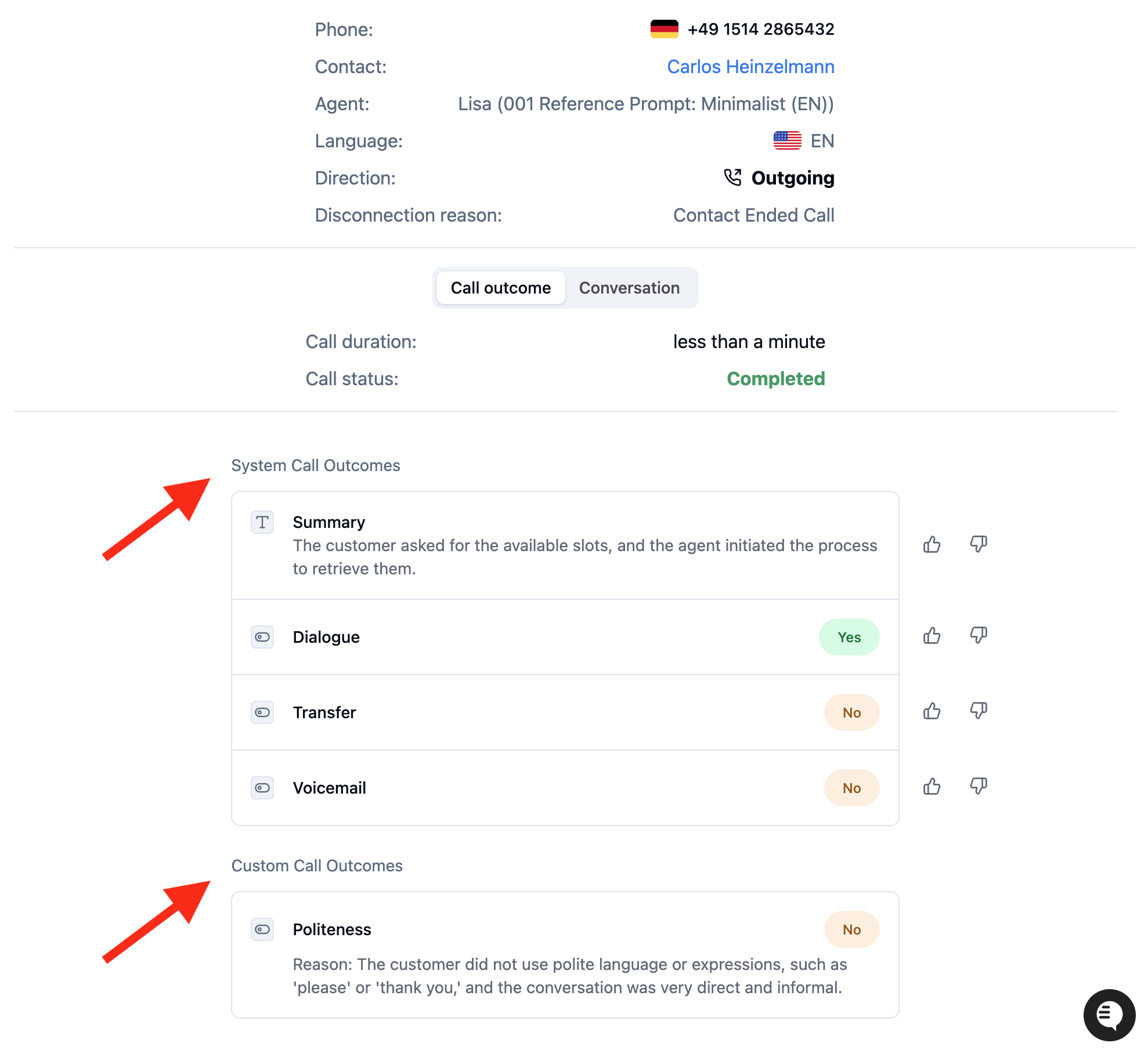 telli provides both **System Call Outcomes** (built-in fields managed by the telli team like Summary,
Dialogue, Transfer, Voicemail) and **Custom Call Outcomes** (fields you define and manage yourself).
Both types appear in Conversation History and webhooks under the `call_analysis` and `call_outcome` keys.
***
## How it works
A dedicated extraction model analyzes the **conversation transcript** and fills your fields:
* **Schema-strict:** output always matches the field type you selected.
* **No guessing:** if a value isn't clearly supported by the transcript, it's **`null`**.
* **Robust to STT:** built for speech-to-text imperfections and everyday phrasing.
If **Reason** is enabled for a field, we also return a short explanation for the chosen value.
***
## Create a field
1. Go to **Agents → \[agent] → Post-processing → Custom call outcomes → Add**.
2. **Name** the field (use `snake_case`, e.g., `lead_conversion`).
3. Pick a **Field type**.
4. Write clear **Instructions** (see [templates](#instruction-templates-copy%2Fpaste)).
5. **Save**. New calls will be analyzed for this field.
telli provides both **System Call Outcomes** (built-in fields managed by the telli team like Summary,
Dialogue, Transfer, Voicemail) and **Custom Call Outcomes** (fields you define and manage yourself).
Both types appear in Conversation History and webhooks under the `call_analysis` and `call_outcome` keys.
***
## How it works
A dedicated extraction model analyzes the **conversation transcript** and fills your fields:
* **Schema-strict:** output always matches the field type you selected.
* **No guessing:** if a value isn't clearly supported by the transcript, it's **`null`**.
* **Robust to STT:** built for speech-to-text imperfections and everyday phrasing.
If **Reason** is enabled for a field, we also return a short explanation for the chosen value.
***
## Create a field
1. Go to **Agents → \[agent] → Post-processing → Custom call outcomes → Add**.
2. **Name** the field (use `snake_case`, e.g., `lead_conversion`).
3. Pick a **Field type**.
4. Write clear **Instructions** (see [templates](#instruction-templates-copy%2Fpaste)).
5. **Save**. New calls will be analyzed for this field.
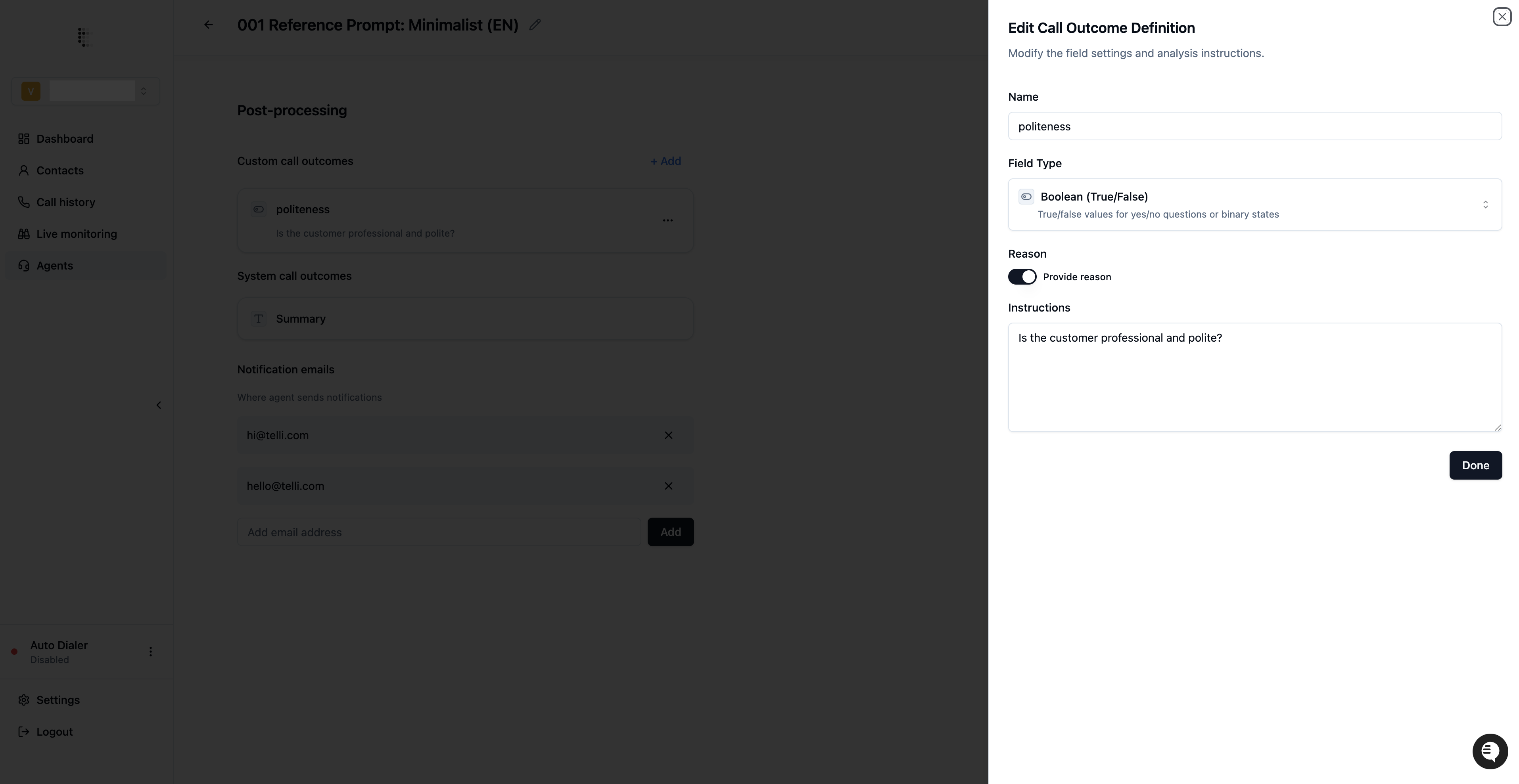 **Field types**
* **Boolean (True/False):** yes/no or binary states
* **Text:** short free-form text
* **Number:** integer or decimal
* **Category:** one option from a list you define (use labels your team understands)
***
## Plan before you add fields
* What decision will this field drive? (reporting, routing, QA, follow-ups)
* Which **type** is simplest for that decision?
* For **Category**, define a small, clear option set.
* Keep the **Instructions** unambiguous and focused on what to extract.
* Confirm downstream systems handle **new fields** and **`null`** safely.
***
## Instruction templates (copy/paste)
* **Boolean — lead conversion**
Set to `true` only if the customer clearly agreed to be contacted again (explicitly or by accepting next steps). Otherwise set to `false`.
* **Category — lost reason**
Select the single best explanation for why the customer is not proceeding.
* Choose `NO_INTEREST` if the customer is no longer interested in the product.
* Choose `PREVIOUSLY_CONTACTED` if the customer already been contacted about this topic
* Choose `TOO_EXPENSIVE` if the customer expresses reluctance about the price of the product
* **Text — follow-up timing**
Return the agreed follow-up time concisely (e.g., `Thursday 09:00`).
* **Number — quantity requested**
Return the total number of units requested.
* **Text — insurance provider (string example)**
Return the exact insurance provider the customer says they are a member of (e.g., `Insurance A`, `Insurance B`, `Insurance C`).
**Best practices**
* One decision per field.
* Prefer **Category** over Text when you'll filter or chart results.
* Include brief examples in the instructions if edge cases exist.
* Remember that the analysis is solely based on the call transcript.
***
## Data you'll receive
Each analysis field follows a consistent data structure:
```json theme={null}
{
"call_outcome": {
"lead_conversion": {
"value": true,
"reason": "Customer confirmed they want to be contacted."
},
"lost_reason": {
"value": "NO_INTEREST",
"reason": "Customer explicitly mentioned that they are not planning to buy right now."
},
"insurance_provider": {
"value": "Insurance A",
"reason": "Customer stated their insurer explicitly."
}
}
}
```
Notes:
* **Reason** appears only if enabled for that field.
* Fields may be **`null`** when the transcript doesn't clearly support a value.
**Field types**
* **Boolean (True/False):** yes/no or binary states
* **Text:** short free-form text
* **Number:** integer or decimal
* **Category:** one option from a list you define (use labels your team understands)
***
## Plan before you add fields
* What decision will this field drive? (reporting, routing, QA, follow-ups)
* Which **type** is simplest for that decision?
* For **Category**, define a small, clear option set.
* Keep the **Instructions** unambiguous and focused on what to extract.
* Confirm downstream systems handle **new fields** and **`null`** safely.
***
## Instruction templates (copy/paste)
* **Boolean — lead conversion**
Set to `true` only if the customer clearly agreed to be contacted again (explicitly or by accepting next steps). Otherwise set to `false`.
* **Category — lost reason**
Select the single best explanation for why the customer is not proceeding.
* Choose `NO_INTEREST` if the customer is no longer interested in the product.
* Choose `PREVIOUSLY_CONTACTED` if the customer already been contacted about this topic
* Choose `TOO_EXPENSIVE` if the customer expresses reluctance about the price of the product
* **Text — follow-up timing**
Return the agreed follow-up time concisely (e.g., `Thursday 09:00`).
* **Number — quantity requested**
Return the total number of units requested.
* **Text — insurance provider (string example)**
Return the exact insurance provider the customer says they are a member of (e.g., `Insurance A`, `Insurance B`, `Insurance C`).
**Best practices**
* One decision per field.
* Prefer **Category** over Text when you'll filter or chart results.
* Include brief examples in the instructions if edge cases exist.
* Remember that the analysis is solely based on the call transcript.
***
## Data you'll receive
Each analysis field follows a consistent data structure:
```json theme={null}
{
"call_outcome": {
"lead_conversion": {
"value": true,
"reason": "Customer confirmed they want to be contacted."
},
"lost_reason": {
"value": "NO_INTEREST",
"reason": "Customer explicitly mentioned that they are not planning to buy right now."
},
"insurance_provider": {
"value": "Insurance A",
"reason": "Customer stated their insurer explicitly."
}
}
}
```
Notes:
* **Reason** appears only if enabled for that field.
* Fields may be **`null`** when the transcript doesn't clearly support a value.